
How to Build an AI automation workflow With n8n or Zapier
Building an AI automation workflow with n8n (or Zapier) is how you stop copying data between tools by hand. This step-by-step guide walks through setting up a workflow that handles repetitive tasks for you, whichever platform you pick.
- How to Build an AI Automation Workflow With n8n or Zapier
- Before You Build AI automation workflow, Define the Task
- n8n vs. Zapier: How They Actually Differ for AI automation workflow
- Building the AI automation workflow in n8n
- Building the Equivalent Workflow in Zapier
- Common Mistakes That Break Workflows After Launch
- Which One Should You Choose?
- Frequently Asked Questions
- Need Help Designing Your Automation Strategy?
- Key Takeaways: Building an AI Automation Workflow With n8n
How to Build an AI Automation Workflow With n8n or Zapier
You’ve probably done this task by hand more times than you’d like to admit: copying a lead from a form into your CRM, summarizing a support email before you reply, or pulling data from three different tools into one spreadsheet. An AI automation workflow can handle all of it without you in the loop. The tricky part isn’t the concept. It’s picking the right platform and building something that keeps working after week one.
This guide walks through how to plan an AI automation workflow, then build it in both n8n and Zapier, since these two platforms solve the same problem in genuinely different ways. By the end, you’ll know which one fits your team, and you’ll have a working structure you can copy for your first real workflow.
lets Read on Nodifytech step by step…
Before You Build AI automation workflow, Define the Task
Skip this step and you’ll spend a weekend building something nobody ends up using. A good candidate task has three traits. It repeats often enough to matter. It follows a pattern, even a loose one. And it currently costs real time or introduces real errors.
Good starting examples include routing support tickets by topic and urgency, qualifying inbound leads before they reach sales, turning meeting transcripts into action items, or pulling structured data out of messy emails and dropping it into a spreadsheet or CRM. Pick one task, not five. You can always add more workflows once the first one proves itself.
n8n vs. Zapier: How They Actually Differ for AI automation workflow
Both platforms now offer AI-agent capability layered on top of a visual workflow builder, but the differences that matter go beyond “which one has more integrations.”
Zapier bills everything as a “task.” A step in a Zap counts as one task each time it runs. As of mid-2026, Zapier introduced model-tier pricing for its “AI by Zapier” steps: a Standard-tier AI step consumes tasks at the normal rate, while Advanced and Premium tiers consume three to five tasks per run. Run a multi-step AI workflow a few hundred times a month, and that adds up fast. Zapier’s separate “Agents” product, for AI teammates that decide their own steps, bills on a different unit entirely, called an “activity,” and each tool call, web search, or lookup an agent makes counts as its own activity. Free accounts get 400 activities a month; the Pro tier runs roughly $33 a month for 1,500.
n8n takes a different approach. Its cloud plans meter by workflow execution rather than by task, and its self-hosted option removes per-run costs entirely once you’re covering your own server. That makes n8n considerably cheaper for high-volume AI workflows, though it asks more of you technically. Building an agent in n8n means connecting a trigger node, an AI Agent node, a language-model node, and separate tool and memory nodes, all inside a visual canvas. It’s more assembly than Zapier’s guided setup, but it gives you far more control over exactly how the agent reasons and what it’s allowed to do.
The short version: Zapier gets you moving faster if you’re not technical and your volume stays modest. n8n costs less at scale and gives technical teams tighter control, at the price of a steeper learning curve.
Building the AI automation workflow in n8n
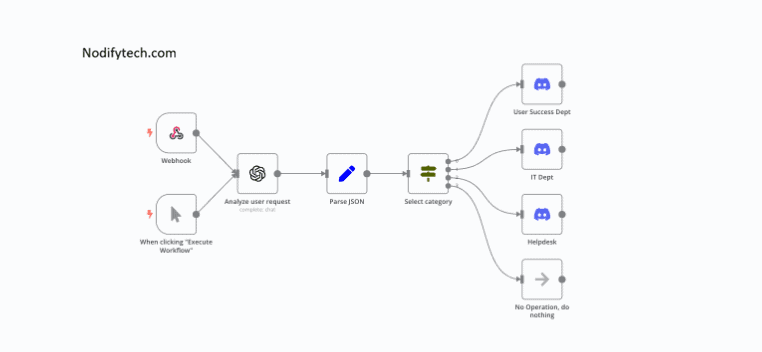
Here’s a simple structure you can build in an afternoon: an agent that reads incoming support emails, classifies them, and drafts a first-pass response for a human to approve.
Step 1 — Add a trigger. Use an email trigger node, or a webhook if your support tool can send data to n8n directly. This starts the workflow every time a new message arrives.
Step 2 — Add the AI Agent node. This is the orchestration layer. It doesn’t do the reasoning itself; it coordinates the sub-nodes connected to it and decides which tools to call based on the incoming message.
Step 3 — Connect a language-model node. Attach a Chat Model sub-node and point it at a provider like OpenAI, Anthropic, or a local model through Ollama. This is the actual reasoning engine behind the agent.
Step 4 — Add memory, if the task needs it. For a single-message classification task, you can skip this. For anything conversational, like a chatbot that needs to remember earlier messages, add a memory node so context carries across turns.
Step 5 — Give the agent tools. Tool nodes are what let the agent do more than talk. Connect a tool that looks up the customer’s account, another that checks order status, and another that drafts a reply in your help desk’s format.
Step 6 — Add an output node. Route the agent’s response somewhere useful: a draft reply in your help desk, a Slack notification for review, or a database row for tracking.
Step 7 — Test with real messages before you trust it. Run the workflow against actual past support emails, not made-up test cases. Messy, ambiguous, real-world input is where agents tend to break first.
Start small. A three-to-five-node workflow that solves one clear problem beats an ambitious ten-tool agent you never finish debugging.
Building the Equivalent Workflow in Zapier
The same idea looks different in Zapier, and it’s genuinely faster to get running.
Step 1 — Create a Zap and pick your trigger. Choose your help desk or inbox app as the trigger, firing on new incoming messages.
Step 2 — Add an “AI by Zapier” step. Write a prompt describing what you want: classify the ticket by category and urgency, and pull out any order number mentioned. Pass the email data into the prompt as a variable.
Step 3 — Branch with a Filter or Paths step. Route urgent tickets one way and routine ones another, based on what the AI step returned.
Step 4 — Add a second AI step to draft a response, if you want the workflow to go further than classification. Feed it the ticket content and your tone guidelines.
Step 5 — Send the output somewhere a human reviews it. A Slack message, a draft in your help desk, or a task in your project tool all work. Don’t let an unreviewed AI response go straight to a customer.
Step 6 — Watch your task usage for the first few weeks. Since AI steps at the Advanced tier consume three tasks per run instead of one, a workflow that looked cheap on paper can burn through your plan faster than expected. Check your usage dashboard early rather than getting surprised by an overage.
If you want a more autonomous version, Zapier’s separate Agents product lets you describe a goal in plain language and let the agent decide its own steps across your connected apps, billed on that separate activity meter rather than your regular task allowance.
Common Mistakes That Break Workflows After Launch
A workflow that works in testing can still fail quietly once it’s live. Watch for these three issues in particular.
Vague prompts drift over time. A prompt that worked well on your first ten test cases can produce inconsistent output once real-world edge cases show up. Revisit and tighten prompts after the first week of real usage, not just before launch.
No fallback for failure. APIs go down, rate limits get hit, and AI responses occasionally come back malformed. Build in error handling and a fallback path, even a simple “route to a human” step, so a single failure doesn’t silently drop a customer message.
No human checkpoint where one matters. Anywhere the workflow’s output reaches a customer, a financial system, or a public-facing channel, keep a person reviewing before it goes out, at least until you’ve built enough confidence in the output to loosen that check.
Which One Should You Choose?
Choose Zapier if you’re not technical, your volume is moderate, and speed of setup matters more than long-term cost. Choose n8n if you have someone comfortable with a slightly steeper learning curve, your workflow will run often enough that per-task pricing gets expensive, or you need tighter control over how the agent reasons and what data it touches. Some teams end up running both: Zapier for simple, low-volume integrations, and n8n for the AI-heavy workflows that would otherwise rack up a large task bill.
Frequently Asked Questions
Do I need to know how to code to build an AI automation workflow? No, for most workflows in either platform. Zapier is built for non-technical users from the ground up. n8n is visual too, but its more advanced patterns, like custom tool nodes, benefit from some technical comfort.
Is n8n cheaper than Zapier? Generally yes, especially at higher volume or for AI-heavy workflows, since n8n meters by execution rather than by task and offers a self-hosted option with no per-run cost. Zapier can still be the better choice for simple, low-volume automations where setup speed matters most.
Can an AI automation workflow replace a human role entirely? Rarely, and it shouldn’t for anything reaching a customer or involving judgment calls. Most reliable workflows keep a human reviewing output at key checkpoints rather than removing people from the process completely.
What’s the difference between a regular Zap and a Zapier Agent? A regular Zap follows a fixed trigger-and-action path you define. A Zapier Agent works from a goal and decides its own steps, browsing the web or querying your data as needed. They’re billed differently too: Zaps use your task allowance, while Agents use a separate activity meter.
How do I know if my workflow is ready to go live? Test it against real historical data, not hypothetical examples, and confirm it handles messy or unexpected input gracefully. If it only works on clean test cases, it isn’t ready yet.
Need Help Designing Your Automation Strategy?
Building one workflow is a good start. Turning automation into a real system, one that fits your existing tools, scales without surprise costs, and keeps the right human checkpoints in place, takes a bit more planning. If you’d rather have that mapped out than figure it out through trial and error, our team helps businesses design AI-assisted content and automation workflows that hold up past the first month.
Featured Snippet Answer: To build an AI automation workflow, The Nodifytech always write the research about AI automation workflow and define one repeatable task, then choose a platform: Zapier for fast, no-code setup at moderate volume, or n8n for lower cost at scale and tighter control. Add a trigger, connect an AI step or agent node, give it the data or tools it needs, and route the output to a human checkpoint before it reaches customers.
Suggested Internal Links:
Key Takeaways: Building an AI Automation Workflow With n8n
Once your AI automation workflow with n8n is running, the real time savings compound with every task it takes off your plate. If you’re evaluating other AI tools for your stack too, see our guide on choosing the right AI tools in 2026.


5 Comments